Showing posts with label Web ADI. Show all posts

Friday, March 6, 2020

How to use Parameters - Web ADI

Many friends commented about parameter use while importing pl/sql API or concurrent program. Sorry for very late post but here you go.

You can create parameters in the 'Uploader' section.

It can be of four types:
None
Value Set
Fnd Lookup
Bne Query - Simple/Complex

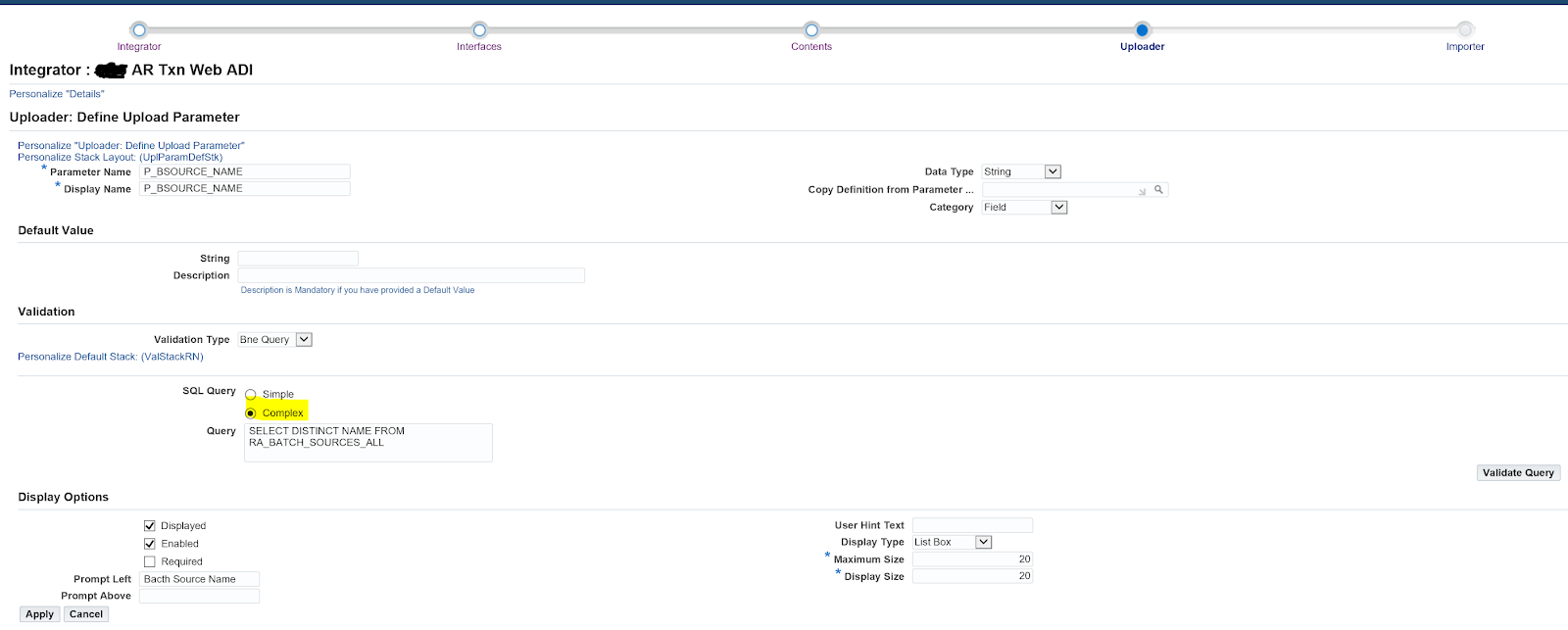
Here I am showing you Bne Query type, Go to 'Uploader' section your integrator and 'Add Parameter'


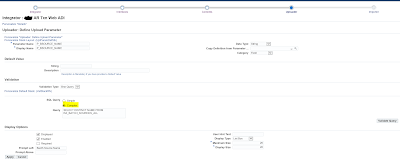
Provide the details as below and note down the Parameter name, Apply


Provide the details as below and note down the Parameter name


Apply and it should look like this


Now, next and move to the 'Importer' section, here I am calling PL/SQL API. Same will be applied to Synchronous/Asynchronous concurrent request call.


Under the Importer Rule section add the PL/SQL API Call rule.

For source, you have four options
Environment Variables
Import  -- Attributes reference of the 'Interface' section, the value you pass from the Spread sheet
Interface Table
Uplaod Parameters 

Here I am showing how to use parameters we created above and the Environment variables
$env$.userid: returns the current user ID
$env$.appid: returns the application ID
$env$.respid: returns the responsibility ID


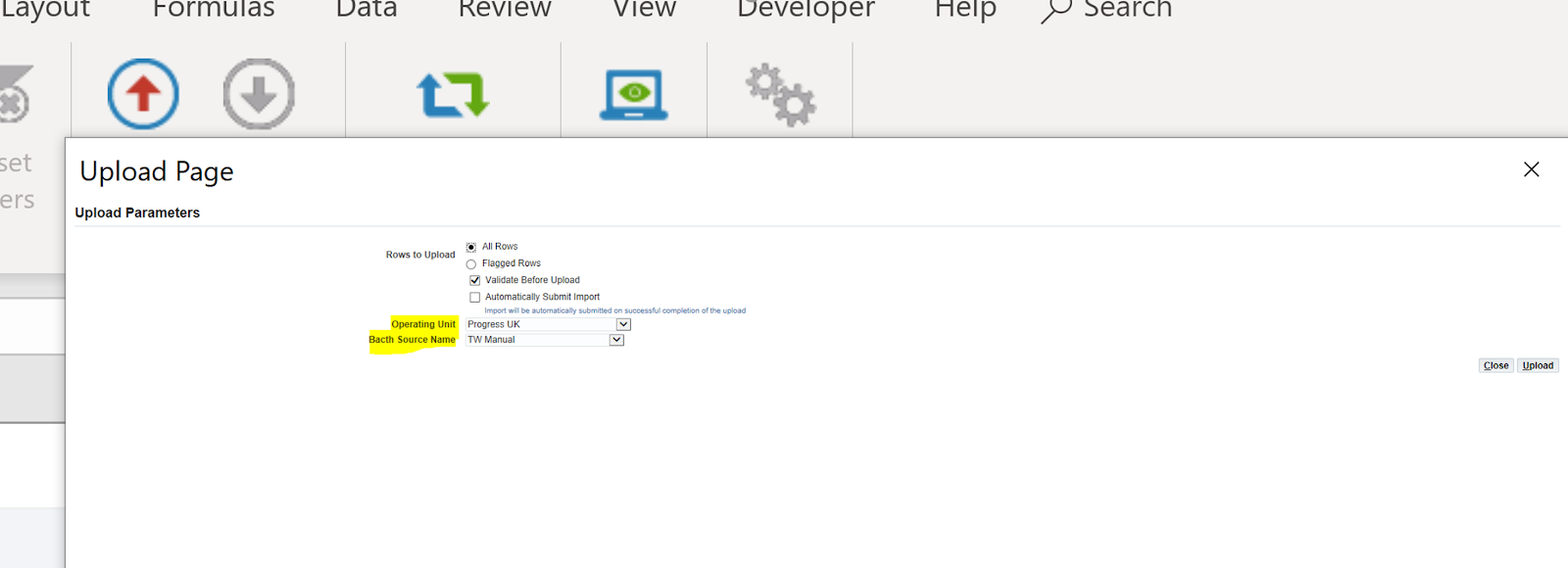
And these parameters will appear when you upload the data and Importer will be called 


Thursday, October 27, 2016

Calling a Concurrent Program - Web ADI


Calling a concurrent program can be achieved by defining an ‘importer’ during Integrator definition (Please follow other Web ADI posts for details).


There are three options to define an importer


Asynchronous concurrent request:
Here Integrator submits the specified concurrent program after completing the upload and returns the request ID to the user, but does not wait for the import program to complete. This importer type reduces the wait time by deferring the import process. However, you need to verify the concurrent program by your own. it is recommended that you define pre-import rules with this type to validate the data at the time of upload. If the pre-validation fails, then integrator returns an error message.

 Synchronous concurrent request:
Integrator submits the specified concurrent program after completing the upload, waits for the program to complete, and then returns the results to the user. This importer type gives users immediate feedback about the success of the import, but can increase the wait time.

 PL/SQL AP:
It is same as the Synchronous concurrent request, only difference is that it calls an API instead on concurrent request and partly reduces the time by bypassing the concurrent processing queue.

Here, I am using an Asynchronous Concurrent Request importer type.
“Asynchronous concurrent request” importer type allows:
-          Pre-Import Rules    - Optional                          
-          Group Definitions  - Optional
-          Document Row : Interface Attribute Mapping - Optional
-          Concurrent Program Request Submission  - Mandatory
-          Success Message Definition  - Optional
-          Cleanup - Optional

Pre-Import Rules:  These can be used to run a select statement or to run some PL/SQL.  We can define a pre-import rule in order to use a value from the spreadsheet as a parameter value in the concurrent program submission.
 
Rule can be based on :
SQL Query
PL/SQL API Function
PL/SQL API Procedure
Sequence


I am using SQL Query and taking benefit_name from the staging table.

* Please note that it always fetches the first row of the result.

Test your query and ‘Apply’

Provide the reference name so that you can refer this rule.
Group Definition:  It is needed when you want to process the records in a particular group. I am skipping it here.

Document Row : Interface Attribute Mapping: This rule type is required for asynchronous concurrent request importer and optional for other importer types. This is how we identify each row that may have a unique result. I am skipping it here.

Concurrent Program Request Submission - Specifies the concurrent program to perform the import. This rule type is required only for an asynchronous or synchronous importer type.
Select the specified concurrent program name and ‘Apply’

Please provide ‘Reference Name’ and any values you want. Here I am providing default value ‘NEW’ to p_status and the importer rule value to the benefit name.

Value source can be:
Environment Variables
Import
Import Table
Upload Parameters

‘Apply’

Success Message Definition: You can provide a message to display when the import process is submitted successfully.

Program 'XXAK: Content Parameter Test ADI Program' Submitted Successfully With Request ID: $import$.requestid
Please verify the status from concurrent request window.

‘Apply’
Cleanup - Specifies cleanup processing to perform if errors occurred during any of the previous importer rules. I am skipping it here.

‘Submit’

> Now It is time to test,  run the ADI
Insert a new row and ‘upload’

Note the request id returned

Check the request


*Parameter tag and value for import is bne:import=Yes or No
Yes: Program submitted automatically after the upload


Ref: My Experience/Oracle Metalink/User Guides/Different other blogs available/Colleagues

Tuesday, November 3, 2015

Showing Custom Error Message - Web ADI

There are two ways to do this.

1>  Simplest way is to change the 'API Returns' attribute to 'FND Message Code' and use raise_application_errro to raise errors
 Desktop Integration Manager > Manage Integrators
  >> Search the Integrator and go to the 'Interfaces' screen and select the Interface
     >> Change the 'API Returns' to 'FND Message Code' if it is null or 'Error Message'
 
>> Now change the exception section of the related API packaged procedure  

when ex_web_adi1 then
   raise_application_error(-20001,'Web ADI Error Message: '||lc_emp_number);

2> Change the exception section of the related API packaged procedure as below

when ex_web_adi1 then
   lc_err_msg := 'Web ADI Error Message: '||lc_emp_number;
   fnd_message.set_name('XXCMN', lc_err_msg);
   --fnd_message.set_token('ERROR_MESSAGE', lc_err_msg);
   lc_mesg := fnd_message.get;     
   raise_application_error(-20001, lc_mesg);


Deployment - Web ADI

We will use the FNDLOAD utility to deploy the Web ADI to other instances.

> We just need to deploy the 'Integrator' because it also includes the realted content,layout and mappings and then the related Form Function (R12)

>> Integrator

select * --integrator_code, application_id,user_name
  from bne_integrators_vl vl
 where user_name like 'XXAK%%'
   and integrator_code like 'XXAK%';
 
fndload apps/<apps password> 0 y download $bne_top/patch/115/import/bneintegrator.lct xxaktestadi_xintg.ldt bne_integrators integrator_asn="XXAKTEST_ADI_XINTG" integrator_code="XXAKTESTADI_XINTG"

fndload apps/<apps password> 0 y upload $bne_top/patch/115/import/bneintegrator.lct xxaktestadi_xintg.ldt

>> Form Function

select * --function_name
  from fnd_form_functions_vl
 where function_name like 'XXAK%';
 
fndload apps/<apps password> 0 y download $fnd_top/patch/115/import/afsload.lct xxaktestadi_func.ldt function function_name="XXAKTESTADI"
 
fndload apps/<apps password> 0 y upload $fnd_top/patch/115/import/afsload.lct xxaktestadi_func.ldt - warning=yes upload_mode=replace custom_mode=force

Please use below scripts if you have to deploy contents/layouts/mappings

>> Content 

select * --content_code
  from bne_content_cols_vl
 where content_code like '%XXAK%';

fndload apps/<apps password> 0 y download $bne_top/patch/115/import/bnecont.lct xxaktestadi_cnt2.ldt bne_contents content_asn="XXAK" content_code="XXAKTESTADI_CNT2"

fndload apps/<apps password> 0 y upload $bne_top/patch/115/import/bnecont.lct xxaktestadi_cnt2.ldt

>> Layout

select *--LAYOUT_CODE
  from bne_layouts_vl vl
 where integrator_code like 'XXAK%';

fndload apps/<apps password> 0 y download $bne_top/patch/115/import/bnelay.lct xxaktestadi_lay.ldt bne_layouts layout_asn="XXAK" layout_code="XXAKTESTADI"

fndload apps/<apps password> 0 y upload $bne_top/patch/115/import/bnelay.lct xxaktestadi_lay.ldt


>> Mapping

select * --mapping_code, integrator_code
  from bne_mappings_vl
 where mapping_code like 'XXAK%';

fndload apps/<apps password> 0 y download $bne_top/patch/115/import/bnemap.lct xxaktestadi_map.ldt bne_mappings mapping_asn="XXAK" mapping_code="XXAKTESTADI"

fndload apps/<apps password> 0 y upload $bne_top/patch/115/import/bnemap.lct xxaktestadi_map.ldt

Thursday, September 24, 2015

Default Parameters - Web ADI

Sometimes you need to default parameters for end users while creating the document.

Like Integrator/Viewer/Reporting/Layout/Content etc.


There are some parameters you need to set achieve this.
Go to the respective form function
Navigation: Application Developer > Application > Function > ‘Form’ Tab > Parameters

Frequently used parameters

> &bne:validation=Y this used to be True or False
> &bne:rows=all Flagged rows : The parameters are FLAGGED or ALL it may be case sensitive
> &bne:viewer=BNE:EXCEL2010
> &bne:content
    >> Content value

select application_id || ':' || content_code content
  from bne_contents_tl
 where user_name like 'XXAK%'
   and language = 'US'

>&bne:integrator
>&bne:layout
    >> Integrator and layout Values

select integrator_app_id || ':' || integrator_code integrator
     , b.application_id || ':' || a.layout_code layouts
  from bne_layouts_tl a
      ,bne_layouts_b  b
 where user_name like 'XXAK%'
   and a.layout_code = b.layout_code
   and language = 'US'

>&bne:allow  'Yes' 'No' -- used for 'Upload Parameter' window to appear or not 
>&bne:import=N / Y : This will set 'Automatically submit Transaction import' to No or Yes when uploading transactions to the interface.
>&bne:import=Y/N : Whether you import automatically or not
>&bne:importPost=Y/N Y : Indicates  'Posting errors to suspense' should be set.
>&bne:importSummary=Y/N : Import in Summary Mode or full
>&bne:importFlex=IMPORTVALIDATION : Description Flexfield validation

Example: bne:page=BneCreateDoc&bne:viewer=BNE:EXCEL2010&bne:reporting=N&bne:integrator=20003:XXAKTESTADI_XINTG&bne:layout=20003:XXAKTESTADI&bne:content=20003:XXAKTESTADI_CNT2&bne:rows=ALL


> Once these values are defaulted correctly then set the profile option
"BNE Allow Set Parameters" at the appropriate level to enforce the default values.

> Clear the cache or stop and restart apache to ensure that the change has taken effect
Navigation: Functional Administrator > Core Services > Caching Framework > Global Configuration > Clear All Cache

Tuesday, September 15, 2015

Web ADI - Errors

Here, I am listing few errors which I came across

Exception Name: oracle.apps.bne.exception.BneFatalException - Error loading class: Log File Bookmark: 236030

Reason: The above error will occur when trying to access "Create Document".
    > Check if there is any space between parameters in the 'Form' tag.

For Parameter details please follow the 'Add a form function and add to specified responsibility menu'  section of this post: Web ADI (Download)

--------------

Exception Name:oracle.jbo.TooManyObjectsException: JBO-25013: Too many objects match the primary key oracle.jbo.Key

ReasonYou are using the same name or you have deleted the interface from application using 'Delete' icon but it's metadata still remains in BNE table(s)

Add a new Interface with a different name
OR
Delete the Interface from backend (If it is a custom BNE) : Delete Interface

-----------------
Exception Name: CANNOT EXECUTE SQL STATEMENT - A LOW LEVEL API CALL FAILED

Reason: Field length is greater than 80 characters, amend the select statement.
----------------

For Excel related errors please follow the below post:

Thursday, September 10, 2015

Enable Trace/Debug - Web ADI

Set the following System Profile Options:

Navigation: System Administrator > Profile > System
                    > BNE%Log%

BNE Server Log Filename : Any Name (Ex: WebADI.log)
BNE Server Log Level    : ERROR
BNE Server Log Path     : Provide the full directory path as per your convenient

> Bounce the Apache Server (adstpall.sh)

>Trace/debug statements will keep increasing the file for every run, to avoid excessive growth of the log file select the appropriate 'BNE Server Log Level' options

Options are: REQUIRED | CRITICAL ERROR | ERROR | WARNING | INFORMATION | DETAIL | TRACE

-- Web ADI Profile Values
select a.profile_option_name
      ,a.user_profile_option_name
      ,a.description
      ,c.profile_option_value
  from fnd_profile_options_tl a
      ,fnd_profile_options b
      ,fnd_profile_option_values c
where b.profile_option_id   = c.profile_option_id
   and a.profile_option_name = b.profile_option_name
   and b.profile_option_name like 'BNE%_LOG%'
   and a.language            = 'US'
;

Custom Web ADI (Download/Upload)

Now we will integrate the download and upload ADIs. We will use the same custom table and packaged procedure used separately in download and upload.


Responsibility: Desktop Integration Manager
> Create Integrator

 XXAK: Test Web ADI
XXAKTESTWEBADI

Check the box for ‘Display in Create Document Page’


Add these three functions
Code:
BNE_ADI_DEFINE_MAPPING
BNE_CREATE_DOCUMENT
BNE_ADI_CREATE_DOCUMENT


Interface type here would be ‘API Procedure’
Package Name: xxak_testadi_pkg
Procedure/Function Name: load_record
API Returns : Error Message


Apply
You can click on ‘Update’ and change prompt and other details required


Create Content
Content type would be ‘SQL Query’
Query : SELECT order_number
      ,start_date
      ,end_date
      ,business_area
      ,batch_number
      ,status
  FROM XXAK_WEB_ADI_DOWNLAOD_TBL
Test Query


Apply

Create Uploader
Uploader: From Template
Select check boxes as below

Skip ‘Create Importer’
Submit


Define Layout
Navigation: Desktop Integrator -> Define Layout -> Select the Integrator


Go > Create

Change the Placement to 'Line'


Next

Apply

Create Mapping
Responsibility: Desktop Integrator
        > Define Mapping
  • Mapping between ‘Interface’ and ‘Content’ data
Apply

Add a form function and add to specified responsibility menu

Responsibility: Application Developer
           > Application > Function
Type: SSWA servlet function
HTML Call: BneApplicationService
Parameter: bne:page=BneCreateDoc&bne:integrator=20003:XXAKTESTWEBADI_XINTG&bne:layout=20003:XXAKTESTWEBADI
select integrator_app_id || ':' || integrator_code integrator
     , application_id || ':' || layout_code layouts
  from bne_layouts_b
 where integrator_code like 'XXAK%'
Add this Function to the specified Menu and go to the related responsibility
Create Document