Showing posts with label Oracle Developer. Show all posts

Tuesday, September 8, 2015

Delete Custom Table Registration

--
BEGIN
/*
   AD_DD.DELETE_COLUMN('XXAK'
                                                  , 'XXAK_WEB_ADI_DOWNLAOD_TBL'
                                                 ,'ORDER_NUMBER'
                                                    );
*/
   AD_DD.DELETE_TABLE('XXAK' -- Application short Name
                                             ,'XXAK_WEB_ADI_DOWNLAOD_TBL'  -- Table Name
                                              );
 
   COMMIT;
 
   dbms_output.put_line('Deleted :');


EXCEPTION
   WHEN OTHERS THEN
      dbms_output.put_line('Error :'||sqlerrm);
      ROLLBACK;
END;
--


Related Post: Register Custom Table

Monday, September 7, 2015

Register Custom Table

Navigation: Application Developer > Application > Database > Table


Registration
--
DECLARE
   vc_appl_short_name  VARCHAR2 (40) := 'XXAK';
   vc_tab_name              VARCHAR2 (32) := 'XXAK_WEB_ADI_DOWNLAOD_TBL';
   vc_tab_type               VARCHAR2 (50) := 'T';
   vn_next_extent          NUMBER        := 512; -- Default Value
   vn_pct_free               NUMBER        := 10;  -- Default Value
   vn_pct_used              NUMBER        := 70;  -- Default Value
   -- Table Details
   CURSOR cur_tab_details (c_tab_name varchar2)
   IS
    SELECT table_name
          ,next_extent
          ,pct_free
          ,pct_used                          
      FROM dba_tables
     WHERE table_name = c_tab_name;
   
   -- Column Details
   CURSOR cur_col_details (c_tab_name varchar2)
   IS
     SELECT column_name
           ,column_id
           ,data_type
           ,data_length
           ,nullable
      FROM all_tab_columns
     WHERE table_name = c_tab_name;
   
   --Primary keys details
   CURSOR cur_pri_key (c_tab_name varchar2)
   IS
    SELECT constraint_name
          ,table_name
      FROM all_constraints
     WHERE constraint_type = 'P'
       AND table_name = c_tab_name;
     
   -- primary key column details
   CURSOR cur_pri_key_details (c_tab_name varchar2, c_constraint_name varchar2)
   IS  
    SELECT column_name
          ,position
      FROM dba_cons_columns
     WHERE table_name = c_tab_name
       AND constraint_name = c_constraint_name;
 
BEGIN
   -- Register Table
   -- Get the table details
   FOR rec_tab_details IN cur_tab_details(vc_tab_name)
   LOOP
      -- Call the API to register table
      ad_dd.register_table (p_appl_short_name => vc_appl_short_name,
                            p_tab_name    => rec_tab_details.table_name,
                            p_tab_type      => vc_tab_type,
                            p_next_extent => NVL(rec_tab_details.next_extent, vn_next_extent),
                            p_pct_free      => NVL(rec_tab_details.pct_free, vn_pct_free),
                            p_pct_used     => NVL(rec_tab_details.pct_used, vn_pct_used)
                           );
   END LOOP; -- End Register Custom Table

   -- Register Column(s)
   -- Get the column details of the table
   FOR rec_col_details IN cur_col_details(vc_tab_name)
   LOOP
      -- Call the API to register column
      ad_dd.register_column (p_appl_short_name      => vc_appl_short_name,
                             p_tab_name             => vc_tab_name,
                             p_col_name             => rec_col_details.column_name,
                             p_col_seq              => rec_col_details.column_id,
                             p_col_type             => rec_col_details.data_type,
                             p_col_width            => rec_col_details.data_length,
                             p_nullable             => rec_col_details.nullable,
                             p_translate            => 'N',
                             p_precision            => NULL,
                             p_scale                => NULL
                            );
   END LOOP;   -- End Register Columns

   -- Register Primary Key
   -- Get the primary key detail of the table
   FOR rec_pri_key IN cur_pri_key(vc_tab_name)
   LOOP
      -- Call the API to register primary_key
      ad_dd.register_primary_key (p_appl_short_name      => vc_appl_short_name,
                                  p_key_name             => rec_pri_key.constraint_name,
                                  p_tab_name             => rec_pri_key.table_name,
                                  p_description          => 'Register primary key',
                                  p_key_type             => 'S',
                                  p_audit_flag           => 'N',
                                  p_enabled_flag         => 'Y'
                                 );
      -- Register Primary Key Columns
      -- Get the primary key column details
      FOR rec_pri_key_details IN  cur_pri_key_details (rec_pri_key.table_name,rec_pri_key.constraint_name)
      LOOP
         -- Call the API to register primary_key_column
         ad_dd.register_primary_key_column
                                     (p_appl_short_name      => vc_appl_short_name,
                                      p_key_name             => rec_pri_key.constraint_name,
                                      p_tab_name             => rec_pri_key.table_name,
                                      p_col_name             => rec_pri_key_details.column_name,
                                      p_col_sequence         => rec_pri_key_details.position
                                     );
      END LOOP; -- End Register Primary Key Column
   END LOOP;    -- End Register Primary Key

   COMMIT;
   DBMS_OUTPUT.PUT_LINE('Table: '||vc_tab_name||' Registered');
EXCEPTION
   WHEN OTHERS THEN
      DBMS_OUTPUT.PUT_LINE('Error in Registration: '||SQLERRM);
      ROLLBACK;
END;
--


Related Post:  Delete Custom Table Registration

Wednesday, July 1, 2015

File Transfer to Windows Server

# This script will show you how to connect to the Database and windows server connection

#                      #!/bin/ksh
#
# ***********************************************************
# Default Applications Object Library specific Parameters
# ***********************************************************
orauser_pwd=${1}
user_id=${2}
user_name=${3}
request_id=${4}
#
# ***********************************************************
# Program Parameters
# ***********************************************************

P_HOST=$5    #Windows Server ip/host
P_USER=$6    #Windows Server User
P_PASS=$7    #Windows Server Password
P_DIR1=$8    #File Dir
P_FILE=$9    #File Name
#
# ***********************************************************
# Local variables
# ***********************************************************
lc_inst='AKPROD'      

# ***********************************************************
# Connect to the Database and get the File Name/ Instance
# ***********************************************************
lc_sql_rec=`sqlplus -s $orauser_pwd <<+ENDOFSQL+
set echo off
set pages 0
set heading off
set termout off
set feed off
set trimspool on
select substr('$P_FILE',instr('$P_FILE','-',-1)+2)
       ||'#'||(select instance_name FROM v\\$instance)
  from dual;
exit
+ENDOFSQL+`


lc_file_name=`echo $lc_sql_rec | cut -f1 -d'#'`
echo "File Name>"
echo $lc_file_name
echo " "
lc_inst_name=`echo $lc_sql_rec | cut -f2 -d'#'`
echo "Instance>"
echo $lc_inst_name
echo " "


#Start the transfer procedure

#Go to the file directory
cd $P_DIR1

# ***********************************************************
#  Check if it is Prod instance
# ***********************************************************

if [ "$lc_inst_name" = "$lc_inst" ]; then
   lc_windows_dir='/AKFiles/LIVE'
   lc_file_name_win='LIVE_'$lc_file_name
else
   lc_windows_dir='/AKFiles/TEST'
   lc_file_name_win='TEST_'$lc_file_name
fi

echo "Windows File Name>"
echo $lc_file_name_win
echo " "

# ***********************************************************
#  Connect to the Windows Server
# ***********************************************************

ftp -n $P_HOST <<END_SCRIPT
quote USER $P_USER
quote PASS $P_PASS
cd $lc_windows_dir
ascii
put $lc_file_name $lc_file_name_win
get $lc_file_name_win $lc_file_name_win
bye
END_SCRIPT

if [ -f $lc_file_name ]; then

  echo "FTP successful"
  rm $lc_file_name_win

  exit 0

else

  echo "FTP failed"
  exit 1
fi

#*******************End of FTP *****************************

Tuesday, June 30, 2015

Wrapping Utility - Part 2

The DBMS_DDL package wraps a single PL/SQL unit, such as a package specification, package body, function, procedure, type specification, or type body.

It contains WRAP function and the CREATE_WRAPPED procedure.

Example: WRAP Function

If pl/sql unit is small, you can directly embed PL/SQL code into another PL/SQL code to wrap and compile it

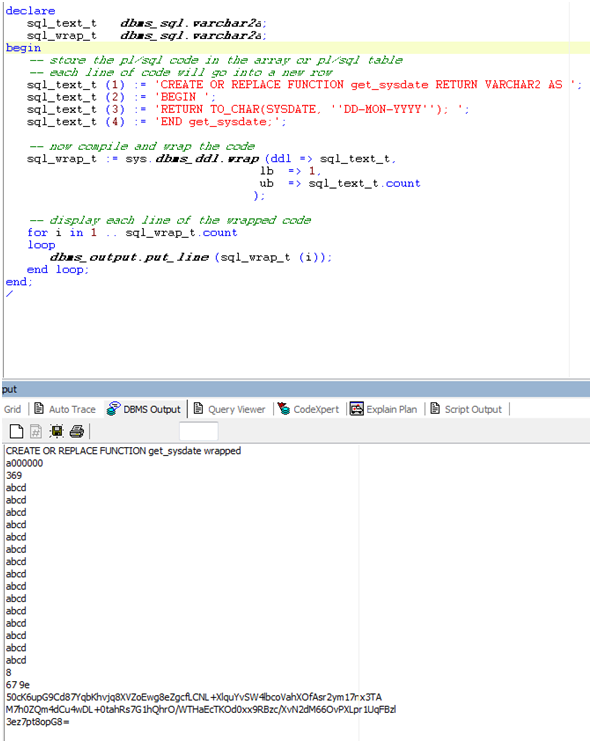
Execute below script and you will same result as we have seen in part 1.

declare
   sql_text_t   dbms_sql.varchar2a;
   sql_wrap_t   dbms_sql.varchar2a;
begin
   -- Store the pl/sql code in the array or pl/sql table
   -- Each line of code will go into a new row
   sql_text_t (1) := 'CREATE OR REPLACE FUNCTION get_sysdate RETURN VARCHAR2 AS ';
   sql_text_t (2) := 'BEGIN ';
   sql_text_t (3) := 'RETURN TO_CHAR(SYSDATE, ''DD-MON-YYYY''); ';
   sql_text_t (4) := 'END get_sysdate;';

   -- now compile and wrap the code
   sql_wrap_t := sys.dbms_ddl.wrap (ddl => sql_text_t,
                                    lb  => 1,
                                    ub  => sql_text_t.count
                                   );

   -- display each line of the wrapped code
   for i in 1 .. sql_wrap_t.count
   loop
      dbms_output.put_line (sql_wrap_t (i));
   end loop;
exception
   when others then
         dbms_output.put_line('Error: '||sqlerrm);
end;
/


Example: CREATE_WRAPPED procedure

Now if the PL/SQL unit is large having several thousand lines, in that case it is better to compile the code into the database first and then execute a PL/SQL code to wrap and compile it. 

Suppose you have a packaged procedure name XXAK_WRAP_TEST_PKG, already compiled in DB.

Describe this package


select text
  from all_source
 where name = 'XXAK_WRAP_TEST_PKG'
   and type = 'PACKAGE BODY'
   and owner = 'APPS';

Now use the CREATE_WRAPPED procedure to wrap this program unit.

Execute the below script to do the job

--
declare
   sql_text_t      dbms_sql.varchar2a;
   v_object_type   varchar2 (40);
   v_object_name   varchar2 (60)      := 'XXAK_WRAP_TEST_PKG';

   cursor c_package_body (v_package_name varchar2)
   is
      select text
        from all_source
       where name = v_package_name
         and type = 'PACKAGE BODY'
         and owner = 'APPS';

   cursor c_procedure (v_procedure varchar2)
   is
      select text
        from all_source
       where name = v_procedure
         and type = 'PROCEDURE'
         and owner = 'APPS';
begin
   begin
      select object_type
        into v_object_type
        from all_objects
       where object_name = v_object_name
         and status = 'VALID';
   exception
      when too_many_rows then
         -- It is recommended to wrap only package body, so that other user can see the specification and use the public part of it
         -- if it is more than one row object is having Specification and Body both
         v_object_type := 'PACKAGE BODY';
      when others then
         dbms_output.put_line('Error while Checking Object Type: '||sqlerrm);
   end;

   if (v_object_type = 'PROCEDURE' or v_object_type = 'FUNCTION') then

      open c_procedure (v_object_name);

      -- get each line of code into each array row, i.e. pl/sql table
      fetch c_procedure
      bulk collect into sql_text_t;

      close c_procedure;

   elsif v_object_type = 'PACKAGE BODY' then

      open c_package_body (v_object_name);

      fetch c_package_body
      bulk collect into sql_text_t;

      close c_package_body;

   end if;

   if sql_text_t.count > 0 then
      -- Code stored in the database does not contain the ddl text, create or replace, we have to add this explicitly
      sql_text_t (1) := 'CREATE OR REPLACE ' || sql_text_t (1);

      -- This will compile the PL/SQL unit again and finally wrap it
      dbms_ddl.create_wrapped (ddl  => sql_text_t,
                                   lb   => 1,
                                   ub   => sql_text_t.count
                                 );
   end if;
   dbms_output.put_line(v_object_name||' is wrapped now.');
exception
   when others then
      dbms_output.put_line('Error while wrapping: '||sqlerrm);
end;
/


Describe the package XXAK_WRAP_TEST_PKG again.


Done! :)

Wrapping Utility - Part 1

Wrapping is the process of hiding PL/SQL source code. It helps to protect your source code from others who might misuse it :)

Oracle has provided the WRAP utility to encrypt source code for this purpose. The WRAP utility can be invoked on the operating system, like Windows, command line as it comes with the Oracle client. It can also be invoked within the database using DBMS_DDL package (Part 2)

Normally PL/SQL code, such as a package specification, package body, function, procedure, type specification, or type body is wrapped using the wrap utility given by Oracle. 

Note: It does not wrap PL/SQL content in anonymous blocks or triggers or non-PL/SQL code 
This is a command line tool and syntax is:

wrap iname=input_file [oname=output_file]

input_file is the name of the file which is containing your source code, it can be with extension or without extension.

wrap iname=/mydir/myfile
wrap iname=/mydir/myfile.sql

output_file is the name of the wrapped file that is created. The defaults extension of output file  is .plb.

wrap iname=/mydir/myfile 
>  Output file will be myfile.plb

wrap iname=/mydir/myfile oname=/yourdir/yourfile.out


>Test: Create a test function Get_Sysdate and store it with name Get_sysdate.sql in your hard drive

Here, I have stored it in directory: D:\Wrapping Utility


Open Command Prompt > Start - Run – cmd - Enter

Goto the directory where you have stored your source file

cd  D:\Wrap Utility
run below command to wrap the file
wrap iname=Get_Sysdate

It will wrap the source code and create a new file Get_Sysdate with default extension .plb


Open the file, you can see the wrapped code.

Now compile the wrapped file


Now check the source code in DB

  select *
    from all_source
   where name = 'GET_SYSDATE'
     and owner = 'APPS';


Now execute the function

select get_sysdate
  from dual;


Monday, September 8, 2014

Concurrent Request Delivery Option (Email) - Unable to determine SMTP server to use

Concurrent Request log of the concurrent program where delivery options were set -- +------------- 2) DELIVER -------------+ Emailing output to xyz@abc.com .............. .............. One or more post-processing actions failed. Consult the OPP service log for details. -- Get the OPP service log ----------------------- SYstem Administrator > Concurrent > Manager > Administer >> Select Outout Post Processor > Click on 'Processes' >> Now click on the 'Manager Log' and look for your request id and error details. OPP log giving below error. oracle.apps.fnd.cp.opp.PostProcessorException: Unable to determine SMTP server to use: set FND_SMTP_HOST Fix --- You just need to set below profile options (SYstem Administrator > Profile > System) FND: SMTP Host FND: SMTP Port How to get the SMTP Host Name ----------------------------- Application ----------- Oracle Application Manager > Workflow >> Click on the 'Notification Mailers' >> Click on "Workflow Notification Mailer" >> Check 'EMail Servers' section >> Check Outbound EMail Account >> Get the value 'Outbound Server Name' Database -------- select fscpv.parameter_value "SMTP Host Name" --SMTP protocol uses default port number 25 for outgoing emails ,25 "SMTP Port Number" ,fscpt.description from fnd_svc_comp_params_tl fscpt ,fnd_svc_comp_param_vals fscpv where fscpt.parameter_id = fscpv.parameter_id and fscpt.display_name = 'Outbound Server Name' --'Inbound Server Name' and fscpt.language = 'US';

Wednesday, November 20, 2013

PDF Attachments are Blank in iPhone/iPad/Other Tablets

Few months back a customer of my client complained that he was not able to open the email attachments(Purchase Orders/Transactions etc.) from their tablets(iPad, iPhone etc.), but the same attachment was fine with desktop or laptop.

Reason: Attachment with html email body is not working in tablets and 'sendmail' plugin was being used with html email body.

Solution to this issue is to use text email body instead of html one.

'mutt' plugin instead of 'sendmail' resolved the issue.

Lets have a look at some mutt commands

mutt -s "$P_SUBJECT" -a $P_ATTFILE $P_MAIL_TO <
/AKUMAR/D1/AKTEST/apps/apps_st/appl/ak/12.0.0/bin/$P_EMAIL_BODY

In the above case it will take 'email from' details from .muttrc profile.
If you want to change the email from, either edit the .muttrc file or use below command

mutt -e "set from=$P_MAIL_FROM" -s "$P_SUBJECT" -a $P_ATTFILE $P_MAIL_TO <
/AKUMAR/D1/AKTEST/apps/apps_st/appl/ak/12.0.0/bin/$P_EMAIL_BODY

There is another profile value in .muttrc 'realname' which is the name/description of the emailid ('from' profile value). You can use below command to override these two profile values

mutt -e "my_hdr From: Email Test Team <$P_MAIL_FROM>" -s "$P_SUBJECT" -a $P_ATTFILE $P_MAIL_TO < /AKUMAR/D1/AKTEST/apps/apps_st/appl/ak/12.0.0/bin/$P_EMAIL_BODY

Generally you can find the .muttrc file in the $HOME directory as a hidden file.

Thursday, August 25, 2011

RICE/CEMLI Terminology

In my Oracle career I often hear confusion over RICE/CEMLI terminologies, what they stands for ? what is the meaning of...blah blah blah....so with the help of my very good friend Charan, I have decided to write my take on this.

AIM (Applications Implementation Methodology) => During packaged ERP(enterprise resource planning) implementations, Clients often have additional requirements apart from the existing (standard) business process, for which they need to create/change the Vanila system (Unchanged ERP Implemented system) processes, and its these changes that come under RICE/RICEW components. AIM is the methodology/standards/published guidelines, which Oracle suggests it's Clients to follow while developing
RICE/RICEW components for their business requirements.

RICE stands for Reports, Interfaces, Conversions, Enhancements / Extensions
-----
 > Sometimes extended to FRICE > F for Forms
                                         -------
                                        OR 
                                        RICEW > W for Workflow.
                                         -------

Forms/Reports/Workflows : Create/Change existing forms/reports/workflows available in  ERP system to  meet the Clients business requirements.

Interfaces : Linking (Programs) between other systems to ERP system in order to synchronize the Data.They can be Manual, Batch or Real-Time. Interfaces can be either outbound or inbound. An outbound interface reads data from Oracle Apps tables and usually creates output files in the third party tool specified format. An inbound interface reads data from flat files (usually) and calls Oracle APIs to upload data into Oracle Apps.

Conversion : It is converting the data structure and data design of legacy system data to satisfy the customer’s business rules before importing it into Oracle .It is like a one time run of an inbound interface except that the amount of data processed during conversion could be potentially huge since all the required data from the legacy system would be transferred to Oracle.

Enhancements/Extensions : Please see below.

>> In R12 RICE components have been extended to CEMLI components.
                                                                             --------

CEMLI Stands for Configurations/Customization, Extension, Modification, Localization, and Integration.


Configurations : Configure the existing, pre-built application features according to your client's requirement.Changing setups and profile values can be the example of configurations.

Customization : Customization means altering/changing the standard objects or creation of custom object to meet client's business need. It may be Extensions or Modifications.

Extensions : Extension means creating custom code from scratch, existing objects (views, packages and java classes etc) can be used. It is having different behaviour from seeded one.

Modifications : Modifications is enhancing/changing the existing code to meet the client's requirements. It is the modification of seeded behaviour.

Localization :  It is to define the different legislative support provided by oracle Applications based on country/region/language requirements.

Integration : It can be Data Integration or Application Integration, options for these two are Open Interface tables, APIs, EAI(Enterprise Application Integration Tools), BPEL, AQ, EDI etc.

             >> Apart from these there is one more term and that is Personalization.

Personalization : Tailoring the layout or visibility of page content to meet client requirements is Personalization. Changing the user interface (UI) look-and-feel, making any field visible/enabled/disabled/mandatory/non mandatory comes under Personalization.


>> There are many guidelines and risks related to RICE/CEMLI components, but that’s for some other day, here I’ll restrict myself to overview of these terminologies.


Saturday, July 16, 2011

Comparing Two Oracle Forms

1> Convert the fmb in txt and compare using any file comparing tool.
File -> Administration -> Object List Report  (It will create a txt file in the same directory)
Then Compare using any text comparing tool.
       OR
2> Another solution is to convert FMB(binary file) to FMT(Text file).
Open your forms, then choose menu File:Administration:Convert:Binary_to_text
This optin generate a Source Code in text format, do it with your files, then compare the files with a command like "diff" on linux, that list all differences line by line if exists

diff file://abhay/clients/forms/*.fmb file://abhay/clients/forms/*.fmb | more